
Join the Conversation
- Find Answers
- :
- Splunk Administration
- :
- Deployment Architecture
- :
- Re: Histogram and bucket size
- Subscribe to RSS Feed
- Mark Topic as New
- Mark Topic as Read
- Float this Topic for Current User
- Bookmark Topic
- Subscribe to Topic
- Mute Topic
- Printer Friendly Page
- Mark as New
- Bookmark Message
- Subscribe to Message
- Mute Message
- Subscribe to RSS Feed
- Permalink
- Report Inappropriate Content
Histogram and bucket size


Hi
I have some proprietary log data that gives 3 different response times for each event.
These are extracted into Timer1,Timer2,Timer3
What I want to achieve is to count the number of timer events that fall into a bucket where i can control the bucket size.
That means that just countingh the number of 0,3 second response time events is not enough, but I also want to control so that it is counted in bucket that holds 0-1 second response times.
As a twist to it, I don't know how many buckets I need, or rather I don't know how long the longest response time is, but I would like to truncated/gather up the values over a certain value..
Then I want to plot the count on the Y axis, and the buckets on the X axis.
I get somewhere by using:
|bin span=1 timer1 as Rtime | chart count as "Count" by Rtime
But then I'm stuck.
- Mark as New
- Bookmark Message
- Subscribe to Message
- Mute Message
- Subscribe to RSS Feed
- Permalink
- Report Inappropriate Content

Working on the same problem this did it for me:
timer1="*"
| bin span=0.01 timer1 as "time in ms"
| chart count as "count" by "time in ms"
However I can't figure out hot to get the labels for the buckets to be shown on the x-axis:
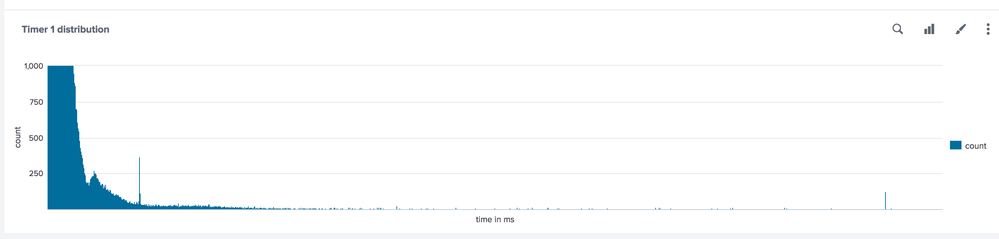
What I would expect are the following buckets to be shown on the x-axis:
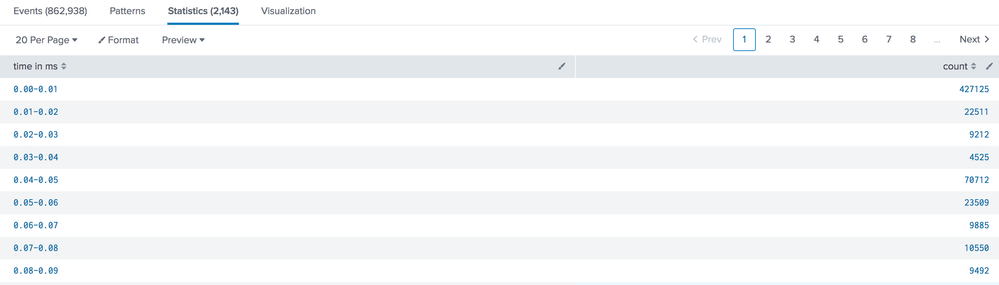
If they are missing because there are just to many to be displayed then how can I configure to say only display every 10th or so?
,working on the same problem this did it for me:
timer1="*"
| bin span=0.01 timer1 as "time in ms"
| chart count as "count" by "time in ms"


- Mark as New
- Bookmark Message
- Subscribe to Message
- Mute Message
- Subscribe to RSS Feed
- Permalink
- Report Inappropriate Content
So how did you get the other timers in (and preferably coded in another color)?

Upcoming Webinar: Unmasking Insider Threats with Slunk Enterprise Security’s UEBA
.conf25 technical session recap of Observability for Gen AI: Monitoring LLM ...
A Season of Skills: New Splunk Courses to Light Up Your Learning Journey
