
Join the Conversation
- Find Answers
- :
- Using Splunk
- :
- Dashboards & Visualizations
- :
- Re: Why is my Splunk REST API Saved Searches Query...
- Subscribe to RSS Feed
- Mark Topic as New
- Mark Topic as Read
- Float this Topic for Current User
- Bookmark Topic
- Subscribe to Topic
- Mute Topic
- Printer Friendly Page
- Mark as New
- Bookmark Message
- Subscribe to Message
- Mute Message
- Subscribe to RSS Feed
- Permalink
- Report Inappropriate Content
Why is my Splunk REST API Saved Searches Query not handling namespace parameter?

(I am currently using Splunk 6.3.3 if that matters.)
Looking at the JavaScript documentation andit appears that I should be able to filter saved searches based on owner, app, and sharing.
I have three saved searches defined in an application:
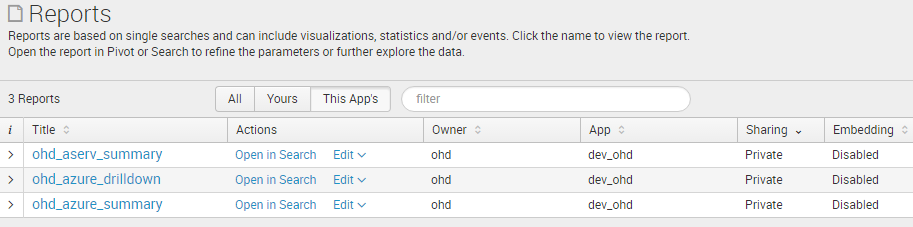
However, when I attempt to get only these searches in the JavaScript & REST API, I see a list of globally shared searches for a variety of different applications:
# Some Javascript...

const splunkConfig = {
  # username, password, etc. for the ohd user
}
const service = new splunkjs.Service(splunkConfig);
const savedSearches = service.savedSearches({owner: "ohd", app: "dev_ohd", sharing: "user"});
savedSearches.fetch(function (err, savedSearches) {
  for (let i = 0; i < savedSearches.list().length; i++) {
    let searchInstance = savedSearches.list()[i];
    console.log(searchInstance.name);
    console.log(searchInstance.namespace);
  }
});
When run this, the above code prints out the following:
... # correct owner, wrong app, wrong sharing
ohd_full_scom_data
{ owner: 'ohd', app: 'search', sharing: 'global' }

# correct owner, app, and sharing
...
ohd_aserv_summary
{ owner: 'ohd', app: 'dev_ohd', sharing: 'user' }
ohd_azure_drilldown
{ owner: 'ohd', app: 'dev_ohd', sharing: 'user' }
ohd_azure_summary
{ owner: 'ohd', app: 'dev_ohd', sharing: 'user' }

# wrong owner, app, and sharing
...
ohd_scom_metric_history
{ owner: 'kevwang', app: 'search', sharing: 'global' }
ohd_splunk_usage
{ owner: 'ohd',
  app: 'splunk_management_console',
  sharing: 'global' }
Per-Panel Filtering - Activity By User Over Time
{ owner: 'admin', app: 'SA-Utils', sharing: 'global' }
Per-Panel Filtering - Recent Activity
{ owner: 'admin', app: 'SA-Utils', sharing: 'global' }
Per-Panel Filtering - Top Users
{ owner: 'admin', app: 'SA-Utils', sharing: 'global' }
...
Is there something obvious that I am missing? Using the REST API through splunk_instance_ip:8089/servicesNS/ohd/dev_ohd/saved/searches the same problem exists.

- Mark as New
- Bookmark Message
- Subscribe to Message
- Mute Message
- Subscribe to RSS Feed
- Permalink
- Report Inappropriate Content


This is the expected behavior. You're seeing searches that are shared globally, which means they effectively do not have an app context.
In your screen shot you have "this apps" selected as your filter, if you select "all" you'll see the other searches there as well.
I think you can use this pagination and filter option to get exactly what you're looking for though:
request.ui_dispatch_app
http://docs.splunk.com/Documentation/Splunk/6.4.1/RESTREF/RESTprolog#Pagination_and_filtering_parame...
http://docs.splunk.com/Documentation/Splunk/6.4.1/RESTREF/RESTsearch#GET_saved.2Fsearches_method_det...

Join the Splunk Community Slack to learn, troubleshoot, and make connections with fellow Splunk practitioners in real time!
Join Splunk User Groups to connect and learn in-person by region or remotely by topic or industry.
Persistent Queue at TcpOut — One of Splunk's Most Practical Features
Catalog Is Now Generally Available on Splunk Cloud Platform
Your Path to AgenticOps: AI Experiences for Every Splunk Practitioner
