
Join the Conversation
- Find Answers
- :
- Using Splunk
- :
- Dashboards & Visualizations
- :
- ValuePrefix and ValueSuffix for Text input
- Subscribe to RSS Feed
- Mark Topic as New
- Mark Topic as Read
- Float this Topic for Current User
- Bookmark Topic
- Subscribe to Topic
- Mute Topic
- Printer Friendly Page
- Mark as New
- Bookmark Message
- Subscribe to Message
- Mute Message
- Subscribe to RSS Feed
- Permalink
- Report Inappropriate Content
ValuePrefix and ValueSuffix for Text input

Hi Team,
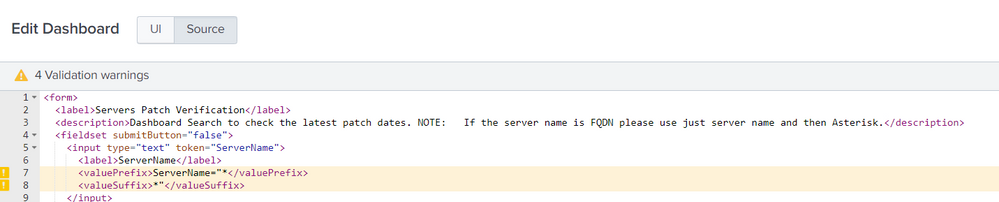
Can anyone help me resolve the Value Prefix and Value Suffix for Text Box input. It says value prefix and value suffix is not allowed here. Attached is the screenshot of my XML.
It is working perfect when I use the same Value Prefix and Value Suffix for Multi select Input.
- Mark as New
- Bookmark Message
- Subscribe to Message
- Mute Message
- Subscribe to RSS Feed
- Permalink
- Report Inappropriate Content

Hi
Try this
[updated]:
<form>
  <label>textinput</label>
  <fieldset submitButton="false">
    <input type="text" token="field1" searchWhenChanged="true">
      <label>field1</label>
      <change>
        <eval token="temp">replace($value$,"\"","") </eval>
      </change>
    </input>
    <input type="dropdown" token="tokText" searchWhenChanged="true" depends="$hide$">
      <label>field2</label>
      <fieldForLabel>token</fieldForLabel>
      <fieldForValue>token</fieldForValue>
      <search>
        <query>| makeresults
| eval token="$temp$"
| makemv delim="," token
| eval token = trim(token)
| mvexpand token
| eval token = "ServerName=\"".token."\""
| mvcombine token delim=" OR "
| nomv token |table token</query>
        <earliest>-24h@h</earliest>
        <latest>now</latest>
      </search>
      <selectFirstChoice>true</selectFirstChoice>
    </input>
  </fieldset>
  <row>
    <panel>
      <table>
        <title>$form.tokText$</title>
        <search>
          <query/>
          <earliest>-24h@h</earliest>
          <latest>now</latest>
        </search>
        <option name="count">10</option>
        <option name="drilldown">none</option>
      </table>
    </panel>
  </row>
</form>
Final value is in token tokText
- Mark as New
- Bookmark Message
- Subscribe to Message
- Mute Message
- Subscribe to RSS Feed
- Permalink
- Report Inappropriate Content

@vinaykataaig please try the following approach using <change> event handler for Splunk text input and using <eval> set the required token with Prefix and Suffix as per your needs (in the following example you can print $tokText$ and confirm).
  <fieldset submitButton="false">
    <input type="text" token="field1" searchWhenChanged="true">
      <label>field1</label>
      <change>
        <eval token="tokText">"ServerName=\"*".$value$."*\""</eval>
      </change>
    </input>
  </fieldset>
| makeresults | eval message= "Happy Splunking!!!"
- Mark as New
- Bookmark Message
- Subscribe to Message
- Mute Message
- Subscribe to RSS Feed
- Permalink
- Report Inappropriate Content
@niketnilay Thanks for responding, Can you prolong your example a little more, Your response is working for single value in Text input, But I am trying to make it work for several input values.
Ex: With in text input if I copy and paste 100 Server names from any spreadsheet, I need all of them to be covered with delimiter like
"Server1", "Server2", "Server3", "Server4", ...
- Mark as New
- Bookmark Message
- Subscribe to Message
- Mute Message
- Subscribe to RSS Feed
- Permalink
- Report Inappropriate Content
@vinaykataaig I had given above snippet as per the code you had in your question assuming you wanted * in the prefix and suffix. If you want to perform complicated replacements you would need to use an independent search the way @vnravikumar has shared. However, here is a simpler approach:
  <search>
    <query>|  makeresults
| eval selectedText="$tokText$"
| eval formattedText="\"".replace(selectedText,"\s","\",\"")."\""
    </query>
    <progress>
      <set token="tokSelectedText">$result.selectedText$</set>
      <set token="tokFormattedText">$result.formattedText$</set>
    </progress>
  </search>
Following is the run anywhere example (Copy paste the content from Excel to the text box to test):
<form>
  <label>Text Box format input copied from Excel</label>
  <fieldset submitButton="false">
    <input type="text" token="tokText">
      <label>Copy Paste values from Excel</label>
    </input>
  </fieldset>
  <search>
    <query>|  makeresults
| eval selectedText="$tokText$"
| eval formattedText="\"".replace(selectedText,"\s","\",\"")."\""
    </query>
    <progress>
      <set token="tokSelectedText">$result.selectedText$</set>
      <set token="tokFormattedText">$result.formattedText$</set>
    </progress>
  </search>
  <row>
    <panel>
      <html>
        <div>
          Value of token passed from Text Box (<code>tokSelectedText</code>): <b>$tokSelectedText$</b>
        </div>
        <div>
          Formatted token as per requirement (<code>tokFormattedText</code>): <b>$tokFormattedText$</b>
        </div>
      </html>
    </panel>
  </row>
</form>
PS: The values in Excel should not have spaces for this to work as regular expression \s matches any whitespace character.
| makeresults | eval message= "Happy Splunking!!!"



Join the Splunk Community Slack to learn, troubleshoot, and make connections with fellow Splunk practitioners in real time!
Join Splunk User Groups to connect and learn in-person by region or remotely by topic or industry.
A Four-Part Event Series: Full Stack Observability For the AI Era
SOC4Kafka - New Kafka Connector Powered by OpenTelemetry
Event Series: Level up your SOC: Advancing with Splunk Enterprise Security
