
Join the Conversation
- Find Answers
- :
- Using Splunk
- :
- Dashboards & Visualizations
- :
- Java script to have return with wildcards
- Subscribe to RSS Feed
- Mark Topic as New
- Mark Topic as Read
- Float this Topic for Current User
- Bookmark Topic
- Subscribe to Topic
- Mute Topic
- Printer Friendly Page
- Mark as New
- Bookmark Message
- Subscribe to Message
- Mute Message
- Subscribe to RSS Feed
- Permalink
- Report Inappropriate Content

Hi I am using java script to change teh column value color in splunk …
var CustomRangeRenderer = TableView.BaseCellRenderer.extend({
          canRender: function (cell) {
              return _('source').contains(cell.field);
          },
i want this with wildcard like this column to have any value before
var CustomRangeRenderer = TableView.BaseCellRenderer.extend({
          canRender: function (cell) {
              return _('*source').contains(cell.field);
          },
- Mark as New
- Bookmark Message
- Subscribe to Message
- Mute Message
- Subscribe to RSS Feed
- Permalink
- Report Inappropriate Content


Can you please try this?
canRender: function(cell) {
            var _lst = cell.field.match('.*source') // Provide your matching criteria
            var _other_lst = ['A', 'Version', 'Version_A'] // In case you have additional Column List
            var list = $.merge(_lst ? _lst : [], _other_lst)
            return _(list).contains(cell.field);
        },
KV
- Mark as New
- Bookmark Message
- Subscribe to Message
- Mute Message
- Subscribe to RSS Feed
- Permalink
- Report Inappropriate Content
Hi Thanks for your response .. But it has not worked for me.
My table is like
sourcetype source time::count
web file access 20
my dashboard is like
dashboard script="table_high2.js" stylesheet="test.css">
<label>test1</label>
<row>
<panel>
<html>
<style>
.css_for_green{
background-color:#65A637 !important;
}
.css_for_yellow{
background-color:#FFFF00 !important;
}
.css_for_red{
background-color:#FF0000 !important;
}
.css_for_grey{
background-color:#EEE000 !important;
}
</style>
</html>
<table id="tableWithColorBasedOnAnotherField">
<search>
<query>index=_internal |stats count by sourcetype,source | rename count as "time::count" </query>
<earliest>-24h@h</earliest>
<latest>now</latest>
<sampleRatio>1</sampleRatio>
</search>
<option name="count">20</option>
<option name="dataOverlayMode">none</option>
<option name="drilldown">row</option>
<option name="percentagesRow">false</option>
<option name="rowNumbers">false</option>
<option name="totalsRow">false</option>
<option name="wrap">true</option>
Java script based on your input
require([
'underscore',
'jquery',
'splunkjs/mvc',
'splunkjs/mvc/tableview',
'splunkjs/mvc/simplexml/ready!'
], function (_, $, mvc, TableView) {
var CustomRangeRenderer = TableView.BaseCellRenderer.extend({
canRender: function(cell) {
var list = cell.field.match('*count') // Provide your matching criteria
return _(list).contains(cell.field);
},
render: function ($td, cell) {
var val = cell.value;
if (val < 5) {
$td.addClass("range-cell").addClass("css_for_green")
}
else if (val <10) {
$td.addClass("range-cell").addClass("css_for_yellow")
}
else if (val > 20 ) {
$td.addClass("range-cell").addClass("css_for_red")
}
}
});
var sh = mvc.Components.get("tableWithColorBasedOnAnotherField");
if (typeof (sh) != "undefined") {
sh.getVisualization(function (tableView) {
// Add custom cell renderer and force re-render
tableView.table.addCellRenderer(new CustomRangeRenderer());
tableView.table.render();
});
}
var sh = mvc.Components.get("tableWithColorBasedOnAnotherField1");
if (typeof (sh) != "undefined") {
sh.getVisualization(function (tableView) {
// Add custom cell renderer and force re-render
tableView.table.addCellRenderer(new CustomRangeRenderer());
tableView.table.render();
});
}
});
Sourcetype
- Mark as New
- Bookmark Message
- Subscribe to Message
- Mute Message
- Subscribe to RSS Feed
- Permalink
- Report Inappropriate Content
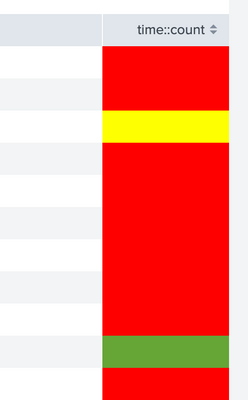
var list = cell.field.match('.*count')instead of
var list = cell.field.match('*count')
It's working for me.
KV
- Mark as New
- Bookmark Message
- Subscribe to Message
- Mute Message
- Subscribe to RSS Feed
- Permalink
- Report Inappropriate Content
Can you please try this?
canRender: function(cell) {
            var _lst = cell.field.match('.*source') // Provide your matching criteria
            var _other_lst = ['A', 'Version', 'Version_A'] // In case you have additional Column List
            var list = $.merge(_lst ? _lst : [], _other_lst)
            return _(list).contains(cell.field);
        },
KV
- Mark as New
- Bookmark Message
- Subscribe to Message
- Mute Message
- Subscribe to RSS Feed
- Permalink
- Report Inappropriate Content
Hi Thanks a lot for your patience . But i get the belwo error when ever i check the developer tools.
"is not defined
at child.canRender "
- Mark as New
- Bookmark Message
- Subscribe to Message
- Mute Message
- Subscribe to RSS Feed
- Permalink
- Report Inappropriate Content
Can you please share you code and sample Output of your search?
- Mark as New
- Bookmark Message
- Subscribe to Message
- Mute Message
- Subscribe to RSS Feed
- Permalink
- Report Inappropriate Content
i havent cleared the history and it worked thanks a lot ..
u r a genius :):):).. i will accept it as solution .. will this one for two fields
var test1 = cell.field.match('.*count') // Provide your matching criteria
var test2 = cell.field.match('.*count1')
var list = $.merge(test1 ? test1 : [], test2)
return _(list).contains(cell.field);
- Mark as New
- Bookmark Message
- Subscribe to Message
- Mute Message
- Subscribe to RSS Feed
- Permalink
- Report Inappropriate Content
Just replace
var list = $.merge(test1 ? test1 : [], test2)with
var list = $.merge(test1 ? test1 : [], test2 ? test2 : [])
🙂
KV

Join the Splunk Community Slack to learn, troubleshoot, and make connections with fellow Splunk practitioners in real time!
Join Splunk User Groups to connect and learn in-person by region or remotely by topic or industry.
How Splunk AI Assistant Is Transforming Investigations: Insights from .conf26
Make Your Machine Data AI-Ready in Splunk
Splunk Asynchronous Forwarding Explained
