
Are you a member of the Splunk Community?
- Find Answers
- :
- Using Splunk
- :
- Dashboards & Visualizations
- :
- I want to drive the display values of a dropdown f...
- Subscribe to RSS Feed
- Mark Topic as New
- Mark Topic as Read
- Float this Topic for Current User
- Bookmark Topic
- Subscribe to Topic
- Mute Topic
- Printer Friendly Page
- Mark as New
- Bookmark Message
- Subscribe to Message
- Mute Message
- Subscribe to RSS Feed
- Permalink
- Report Inappropriate Content

Hi
I have the following drop-down. It works just fine.
How do i get "Context Source Search": to update to the value of the token (RequestDocument3) if i set the token outside the dropbox?
<input type="dropdown" token="MXTIMING_Context_token" searchWhenChanged="true">
        <label>Context Source Search:</label>
        <choice value="*">All</choice>
        <search>
          <!--query>eventtype=mlc sourcetype="MX_TIMING" host=$host_token$ | search name = "$MXTIMING_Context_token$" | stats count by Command | fields - count</query-->
          <query>| tstats summariesonly=true count(MXTIMING.Elapsed) AS count FROM datamodel=MXTIMING WHERE ( host=$host_token$) GROUPBY MXTIMING.Context2 | dedup MXTIMING.Context2 | sort MXTIMING.Context2 | fields - count</query>
          <earliest>$time_selection.earliest$</earliest>
          <latest>$time_selection.latest$</latest>
        </search>
        <fieldForLabel>MXTIMING.Context</fieldForLabel>
        <fieldForValue>MXTIMING.Context2</fieldForValue>
        <default>*</default>
        <prefix/>
      </input>
Image below of it working.... however i can also set the token from clicking the table, but i cant get the drop down to update.
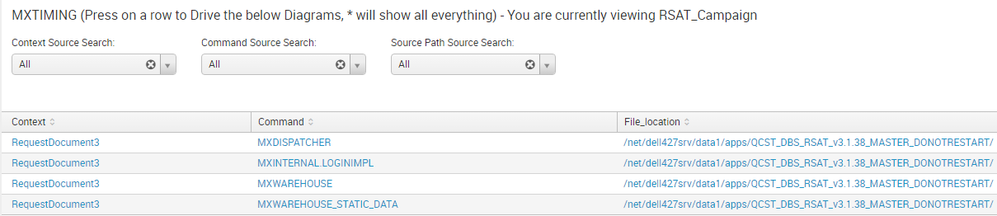
so RequestDocument3 is what i am looking to display in both examples
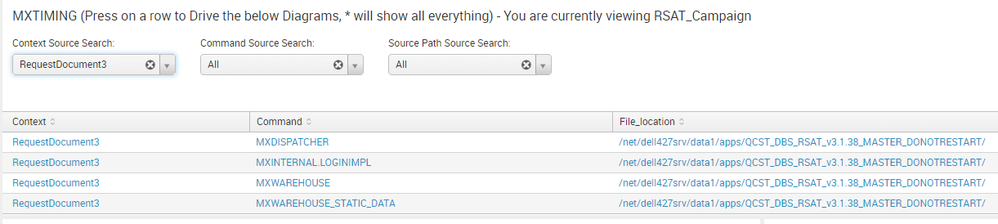
Image below of setting token from table, but drop-down does not update. I have tried a few things but nothing seem to be OK.


- Mark as New
- Bookmark Message
- Subscribe to Message
- Mute Message
- Subscribe to RSS Feed
- Permalink
- Report Inappropriate Content

@robertlynch2020... Seems like you are setting token value from Table <drilldown> event as well. Can you put that code here?
Ideally your table drilldown should be setting a token for Dropdown with the a query like the following
<drilldown>
   <set token="MXTIMING_Context_token">$row.Context$</set>
   <set token="form.MXTIMING_Context_token">$row.Context$</set>
</drilldown>
PS: Since we do not have your existing drilldown code for table, please adjust the above two set token commands accordingly.
| makeresults | eval message= "Happy Splunking!!!"
- Mark as New
- Bookmark Message
- Subscribe to Message
- Mute Message
- Subscribe to RSS Feed
- Permalink
- Report Inappropriate Content
@robertlynch2020... Seems like you are setting token value from Table <drilldown> event as well. Can you put that code here?
Ideally your table drilldown should be setting a token for Dropdown with the a query like the following
<drilldown>
   <set token="MXTIMING_Context_token">$row.Context$</set>
   <set token="form.MXTIMING_Context_token">$row.Context$</set>
</drilldown>
PS: Since we do not have your existing drilldown code for table, please adjust the above two set token commands accordingly.
| makeresults | eval message= "Happy Splunking!!!"
- Mark as New
- Bookmark Message
- Subscribe to Message
- Mute Message
- Subscribe to RSS Feed
- Permalink
- Report Inappropriate Content
Cheers, I had the $row.Context$ but i did not have the form part. This was it.
thanks 🙂
- Mark as New
- Bookmark Message
- Subscribe to Message
- Mute Message
- Subscribe to RSS Feed
- Permalink
- Report Inappropriate Content
@robertlynch2020 Too many beers for you today!!! Cheers! 🙂
| makeresults | eval message= "Happy Splunking!!!"

Index This | Why did the turkey cross the road?
Enter the Agentic Era with Splunk AI Assistant for SPL 1.4
Feel the Splunk Love: Real Stories from Real Customers
