
Join the Conversation
- Find Answers
- :
- Using Splunk
- :
- Dashboards & Visualizations
- :
- Re: How to create a custom filter with months in t...
- Subscribe to RSS Feed
- Mark Topic as New
- Mark Topic as Read
- Float this Topic for Current User
- Bookmark Topic
- Subscribe to Topic
- Mute Topic
- Printer Friendly Page
- Mark as New
- Bookmark Message
- Subscribe to Message
- Mute Message
- Subscribe to RSS Feed
- Permalink
- Report Inappropriate Content

I would like to create a time filter in my dashboard based on Month reports, something like below:
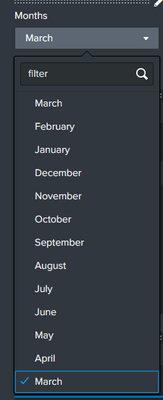
But each month time frame should be customized on this way:
January -> Between 15/12/2022 (previous year) and 05/01/2023 (current year)
February -> Between 15/01/2023 and 05/02/2023
March -> Between 15/02/2023 and 05/03/2023
....
This should be used to filter the data presented on the dashboard based on the month selected.
- Mark as New
- Bookmark Message
- Subscribe to Message
- Mute Message
- Subscribe to RSS Feed
- Permalink
- Report Inappropriate Content
Hi @gcusello ,
Thank you for your help. I was able to get to a solution on this way:
I created a dataset with the months and the range dates that I needed:
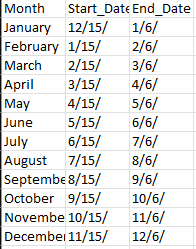
Then using the dropdown created with the months that can be selected by the user I added a sub search to each panel on the dashboard using that as a filter (based on the token from the dropdown).
[search index=index_used | head 1 | fillnull value="" | eval month="$month_search$" | eval year=strftime(_time,"%Y") | lookup Months.csv Month as month OUTPUT Start_Date as RR_Start_Date, End_Date as RR_End_Date | eval latest=RR_End_Date.year | eval year=if(month="January", year - 1, year) | eval earliest=RR_Start_Date.year | eval earliest=strptime(earliest,"%m/%d/%Y") | eval latest=strptime(latest,"%m/%d/%Y") | table earliest, latest | format "" "" "" "" "" ""]
Regarding your question:
Then I don't understand how you manage the missing periods, e.g. from 06/01/2023 and 14/01/2023 -> On that period we don't have data that should be used on the report.
Thank you!
- Mark as New
- Bookmark Message
- Subscribe to Message
- Mute Message
- Subscribe to RSS Feed
- Permalink
- Report Inappropriate Content


Hi @Drake_IT,
this is possible creating a lookup containing at least three columns:
- Month
- StartTime
- EndTime
Then you can use these column to associate the "Month" field to each event and then run a statistic.
Could you share some sample of your data?
Then I don't understand how you manage the missing periods, e.g. from 06/01/2023 and 14/01/2023.
Ciao.
Giuseppe
- Mark as New
- Bookmark Message
- Subscribe to Message
- Mute Message
- Subscribe to RSS Feed
- Permalink
- Report Inappropriate Content
Hi @gcusello ,
Thank you for your help. I was able to get to a solution on this way:
I created a dataset with the months and the range dates that I needed:
Then using the dropdown created with the months that can be selected by the user I added a sub search to each panel on the dashboard using that as a filter (based on the token from the dropdown).
[search index=index_used | head 1 | fillnull value="" | eval month="$month_search$" | eval year=strftime(_time,"%Y") | lookup Months.csv Month as month OUTPUT Start_Date as RR_Start_Date, End_Date as RR_End_Date | eval latest=RR_End_Date.year | eval year=if(month="January", year - 1, year) | eval earliest=RR_Start_Date.year | eval earliest=strptime(earliest,"%m/%d/%Y") | eval latest=strptime(latest,"%m/%d/%Y") | table earliest, latest | format "" "" "" "" "" ""]
Regarding your question:
Then I don't understand how you manage the missing periods, e.g. from 06/01/2023 and 14/01/2023 -> On that period we don't have data that should be used on the report.
Thank you!
- Mark as New
- Bookmark Message
- Subscribe to Message
- Mute Message
- Subscribe to RSS Feed
- Permalink
- Report Inappropriate Content
Hi @Drake_IT,
good for you, see next time!
Ciao and happy splunking
Giuseppe
P.S.: Karma Points are appreciated 😉

Your Guide to Splunk Digital Experience Monitoring
Data Management Digest – November 2025
Upcoming Webinar: Unmasking Insider Threats with Slunk Enterprise Security’s UEBA
