
Turn on suggestions
Auto-suggest helps you quickly narrow down your search results by suggesting possible matches as you type.
Dashboards & Visualizations
×
Are you a member of the Splunk Community?
Sign in or Register with your Splunk account to get your questions answered, access valuable resources and connect with experts!
Turn on suggestions
Auto-suggest helps you quickly narrow down your search results by suggesting possible matches as you type.
- Find Answers
- :
- Using Splunk
- :
- Dashboards & Visualizations
- :
- Re: How to convert epoch time format to a human re...
Options
- Subscribe to RSS Feed
- Mark Topic as New
- Mark Topic as Read
- Float this Topic for Current User
- Bookmark Topic
- Subscribe to Topic
- Mute Topic
- Printer Friendly Page
- Mark as New
- Bookmark Message
- Subscribe to Message
- Mute Message
- Subscribe to RSS Feed
- Permalink
- Report Inappropriate Content

j666gak
Communicator
03-11-2015
03:48 PM
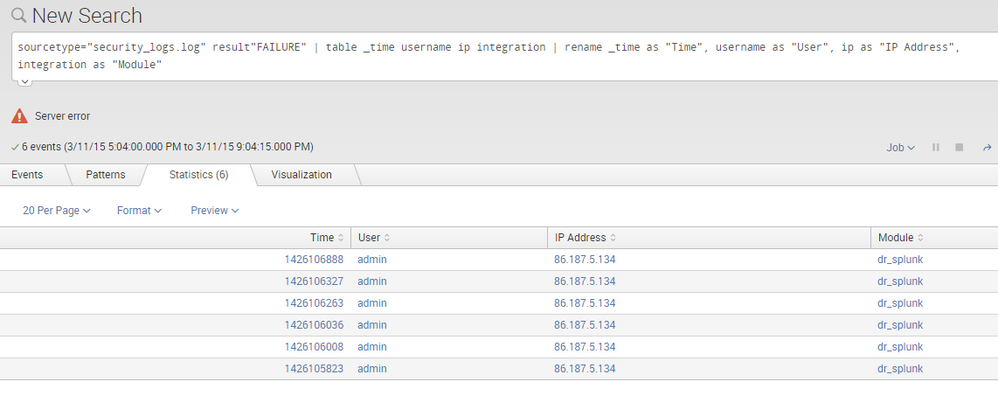
I am creating some of my first dashboards, and I am having trouble working out how to change the output in the column titled Time to something humanly readable.
Can somebody please point me to what I need to change in the in the search criteria

1 Solution
- Mark as New
- Bookmark Message
- Subscribe to Message
- Mute Message
- Subscribe to RSS Feed
- Permalink
- Report Inappropriate Content

ppablo
Retired
03-11-2015
03:55 PM
Hi @j666gak
Adding this to your search should do the trick
eval Time=strftime(Time, "%m/%d/%Y %H:%M:%S")
- Mark as New
- Bookmark Message
- Subscribe to Message
- Mute Message
- Subscribe to RSS Feed
- Permalink
- Report Inappropriate Content
ppablo
Retired
03-11-2015
03:55 PM
Hi @j666gak
Adding this to your search should do the trick
eval Time=strftime(Time, "%m/%d/%Y %H:%M:%S")
- Mark as New
- Bookmark Message
- Subscribe to Message
- Mute Message
- Subscribe to RSS Feed
- Permalink
- Report Inappropriate Content
ppablo
Retired
03-11-2015
04:04 PM
Here is some supplemental reading from documentation on various ways to convert field values.
http://docs.splunk.com/Documentation/Splunk/6.2.2/SearchReference/Convert
http://docs.splunk.com/Documentation/Splunk/6.2.2/SearchReference/CommonEvalFunctions

Get Updates on the Splunk Community!
Splunk Observability for AI
Don’t miss out on an exciting Tech Talk on Splunk Observability for AI!
Discover how Splunk’s agentic AI ...
[Puzzles] Solve, Learn, Repeat: Dereferencing XML to Fixed-length events
This challenge was first posted on Slack #puzzles channelFor a previous puzzle, I needed a set of fixed-length ...
Stay Connected: Your Guide to December Tech Talks, Office Hours, and Webinars!
What are Community Office Hours?
Community Office Hours is an interactive 60-minute Zoom series where ...
