
Join the Conversation
- Find Answers
- :
- Using Splunk
- :
- Dashboards & Visualizations
- :
- How to chart a table by two parameters
- Subscribe to RSS Feed
- Mark Topic as New
- Mark Topic as Read
- Float this Topic for Current User
- Bookmark Topic
- Subscribe to Topic
- Mute Topic
- Printer Friendly Page
- Mark as New
- Bookmark Message
- Subscribe to Message
- Mute Message
- Subscribe to RSS Feed
- Permalink
- Report Inappropriate Content
How to chart a table by two parameters

Hi there,
I have s splunk search command as follows, it have [year_month, service_label, condition, value]
|inputlookup druid_availability_lookup.csv
|stats sum(good_events) as good_events, sum(total) as total by year_month
|eval service_label = "Druid Data Service-availablity", value=round((good_events/total)*100, 2), condition= if(value<=100, "Fail","")
|table year_month, service_label, condition, value
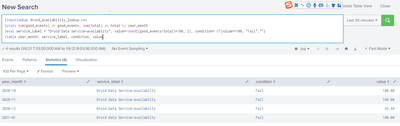
And i want to displays this result by year_month, when i append commans [|chart values(value) over service_label by year_month] , it will displays as follows, the condition column will be losed.
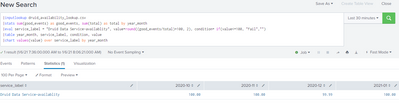
Is there any methods that can display the result by year_month and also include the condition parameters, thanks
- Mark as New
- Bookmark Message
- Subscribe to Message
- Mute Message
- Subscribe to RSS Feed
- Permalink
- Report Inappropriate Content

Another option if you don't plan on turning this into a graph and will only be using the chart itself:
| eval service_label = "Druid Data Service-availability", value=round((good_events/total)*100,2), condition=if(value<=100,"Fail",""),value=if(condition="",value,value." (".condition.")")- Mark as New
- Bookmark Message
- Subscribe to Message
- Mute Message
- Subscribe to RSS Feed
- Permalink
- Report Inappropriate Content
Please check if the below query helps.
| makeresults
| eval _raw="year_month service_label condition value
2020-10 Drudit fail 100.0
2020-11 Drudit fail 100.0
2020-12 Drudit fail 100.0"
| multikv forceheader=1
| table year_month condition service_label value
| transpose header_field=year_month
| rename column as temp
-----------------------------------------------------------
An upvote would be appreciated if the above reply is useful to you.


Join the Splunk Community Slack to learn, troubleshoot, and make connections with fellow Splunk practitioners in real time!
Join Splunk User Groups to connect and learn in-person by region or remotely by topic or industry.
Rounding off the Splunk Dashboard Contest
A Four Part Event Series: AI + Observability: AI Agents, LLMs, Apps, & Infrastructure
Splunk Technical Support Is Moving to Cisco Support Tools
