
Join the Conversation
- Find Answers
- :
- Using Splunk
- :
- Dashboards & Visualizations
- :
- How can I change the color of the Single value vis...
- Subscribe to RSS Feed
- Mark Topic as New
- Mark Topic as Read
- Float this Topic for Current User
- Bookmark Topic
- Subscribe to Topic
- Mute Topic
- Printer Friendly Page
- Mark as New
- Bookmark Message
- Subscribe to Message
- Mute Message
- Subscribe to RSS Feed
- Permalink
- Report Inappropriate Content

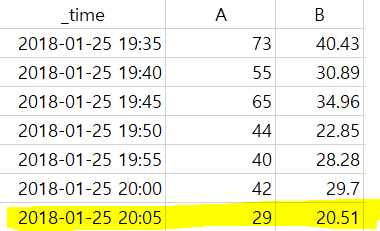
*field A is something's value, and B is its "standard deviation"
If I make a table chart like this, and want to change this form to "single value", it will came out like this.
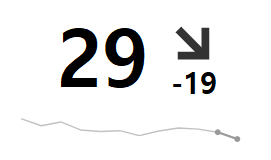
The problem is setting the colors.
I want to make colors like this.
If field "B" is from 0 to 10, the values(field A) getting Green color.
If field "B" is from 10 to 20 the values(field A) getting Green yellow.
If field "B" is from 20 to 30, the values(field A) getting Orange.
If field "B" is from 30 to 40, the values(field A) getting Red.
But when I tried to use "single value" option, the "color option's values" are following "field A's value"
I wondering if changing Dashboard Source, make it possible to change color by field B.
    <panel>
      <single>
        <title>EXAMPLE</title>
        <search base="test">
          <query>|example </query>
        </search>
        <option name="colorBy">value</option>
        <option name="drilldown">all</option>
        <option name="numberPrecision">0</option>
        <option name="rangeValues">[0,10,25,40]</option>
        <option name="trendDisplayMode">percent</option>
        <option name="trendInterval">-5m</option>
        <option name="unit">count</option>
        <option name="useColors">1</option>
      </single>
    </panel>
This is single value's option at Dashboard Source.
So, can it be possible to change color like this way?


- Mark as New
- Bookmark Message
- Subscribe to Message
- Mute Message
- Subscribe to RSS Feed
- Permalink
- Report Inappropriate Content

@stardust927, you can use Status Indicator Custom Visualization to show a different value for display and color/icon by a different value. However, you will not have trendline as available in Single Value.
| makeresults | eval message= "Happy Splunking!!!"
- Mark as New
- Bookmark Message
- Subscribe to Message
- Mute Message
- Subscribe to RSS Feed
- Permalink
- Report Inappropriate Content
@stardust927, you can use Status Indicator Custom Visualization to show a different value for display and color/icon by a different value. However, you will not have trendline as available in Single Value.
| makeresults | eval message= "Happy Splunking!!!"
- Mark as New
- Bookmark Message
- Subscribe to Message
- Mute Message
- Subscribe to RSS Feed
- Permalink
- Report Inappropriate Content

You need to add lines to specify the colors and number ranges...
<option name="rangeColors">["0x008000","0xffff00","0xff6600","0xff0000"]</option>
<option name="rangeValues">[10,20,30]</option>
The above can be changed to your preferences for hex representations of the colors you want.
- Mark as New
- Bookmark Message
- Subscribe to Message
- Mute Message
- Subscribe to RSS Feed
- Permalink
- Report Inappropriate Content
I want t show the field A's value, and I want to set colors by field B's value ...
If I change rangeValues, and rangeColors number, it follows field A's value...

Your Guide to Splunk Digital Experience Monitoring
Data Management Digest – November 2025
Upcoming Webinar: Unmasking Insider Threats with Slunk Enterprise Security’s UEBA
