
Join the Conversation
- Find Answers
- :
- Using Splunk
- :
- Dashboards & Visualizations
- :
- Drop down menu feed another drop down menu
- Subscribe to RSS Feed
- Mark Topic as New
- Mark Topic as Read
- Float this Topic for Current User
- Bookmark Topic
- Subscribe to Topic
- Mute Topic
- Printer Friendly Page
- Mark as New
- Bookmark Message
- Subscribe to Message
- Mute Message
- Subscribe to RSS Feed
- Permalink
- Report Inappropriate Content
Drop down menu feed another drop down menu

Hello All,
I am trying to figure out how to create drop down menu that dynamically feeds another drop down menu. I am trying to create a dashboard for management to select a person who owns data in Splunk and based on that select have the next drop down menu auto fill with the roles that are assigned to said data owner.
Example:
Bob owns two roles bobs_users and bobs_powers
Tom owns three roles toms_users, toms_powers and toms_admin
Cat owns two roles cats_user and cats_admin
Then based on the two drop down menus have it auto populate the roles in the following simple search:
| rest /services/authentication/users splunk_server=local
| fields title roles capabilities
| rename title as User
| search roles=$role$
I am not having much luck as the owners are not index any where in Splunk. I mean I could create a one time lookup file and use that to try and auto populate the roles drop down, but trying to do everything from drop down menus/xml without having to do extra work if possible.
Any ideas?
thanks
ed
- Mark as New
- Bookmark Message
- Subscribe to Message
- Mute Message
- Subscribe to RSS Feed
- Permalink
- Report Inappropriate Content

hello there,
hope i understood the question,
see screenshot here and code below:
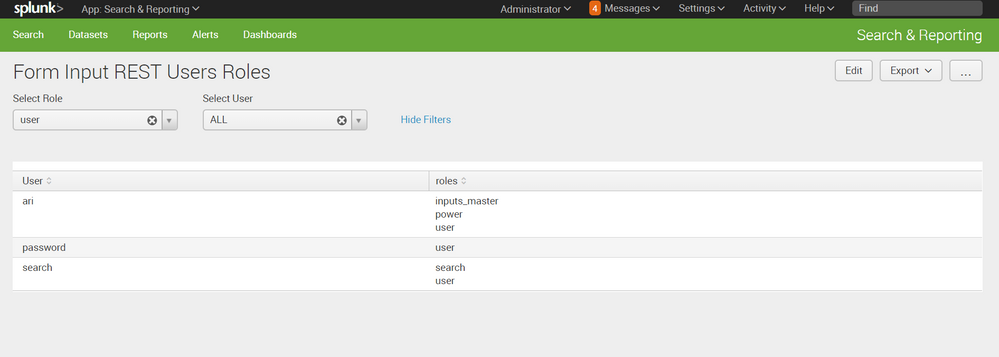
kml:
<form>
  <label>Form Input REST Users Roles</label>
  <fieldset submitButton="false">
    <input type="dropdown" token="ROLE" searchWhenChanged="true">
      <label>Select Role</label>
      <choice value="*">ALL</choice>
      <default>*</default>
      <initialValue>*</initialValue>
      <fieldForLabel>role</fieldForLabel>
      <fieldForValue>role</fieldForValue>
      <search>
        <query>| rest /services/authentication/users splunk_server=local
| stats values(roles) as role
| mvexpand role</query>
        <earliest>-24h@h</earliest>
        <latest>now</latest>
      </search>
    </input>
    <input type="dropdown" token="USER" searchWhenChanged="true">
      <label>Select User</label>
      <choice value="*">ALL</choice>
      <default>*</default>
      <initialValue>*</initialValue>
      <fieldForLabel>User</fieldForLabel>
      <fieldForValue>User</fieldForValue>
      <search>
        <query>| rest /services/authentication/users splunk_server=local
| fields title roles
| rename title as User
| search roles=$ROLE$
| table User</query>
        <earliest>-24h@h</earliest>
        <latest>now</latest>
      </search>
    </input>
  </fieldset>
  <row>
    <panel>
      <table>
        <search>
          <query>| rest /services/authentication/users splunk_server=local
| fields title roles
| rename title as User
| search roles=$ROLE$ User=$USER$</query>
          <earliest>0</earliest>
          <latest></latest>
          <sampleRatio>1</sampleRatio>
        </search>
        <option name="count">50</option>
        <option name="dataOverlayMode">none</option>
        <option name="drilldown">none</option>
        <option name="percentagesRow">false</option>
        <option name="refresh.display">progressbar</option>
        <option name="rowNumbers">false</option>
        <option name="totalsRow">false</option>
        <option name="wrap">true</option>
      </table>
    </panel>
  </row>
</form>
hope it helps
- Mark as New
- Bookmark Message
- Subscribe to Message
- Mute Message
- Subscribe to RSS Feed
- Permalink
- Report Inappropriate Content

If you've access to "Splunk 6: dashboard examples" app (https://splunkbase.splunk.com/app/1603/) , you can reference "Form Input Element>>Cascading Form Input".



Join the Splunk Community Slack to learn, troubleshoot, and make connections with fellow Splunk practitioners in real time!
Join Splunk User Groups to connect and learn in-person by region or remotely by topic or industry.
From Raw Data to Executive-Ready Stories, Faster
Guided Onboarding with Auto-schema Is Now Generally Available
ATTENTION: We’re Moving! (AGAIN!)
