
Join the Conversation
- Find Answers
- :
- Using Splunk
- :
- Dashboards & Visualizations
- :
- Re: Charting timeframes from a lookup table.
- Subscribe to RSS Feed
- Mark Topic as New
- Mark Topic as Read
- Float this Topic for Current User
- Bookmark Topic
- Subscribe to Topic
- Mute Topic
- Printer Friendly Page
- Mark as New
- Bookmark Message
- Subscribe to Message
- Mute Message
- Subscribe to RSS Feed
- Permalink
- Report Inappropriate Content

Hello! I'm trying to do a charting task from a lookup table and can't seem to nail down a solution.
This is the essentially format of my data in the csv.
| Status | Opened Date | Closed Date |
| Open | 4/3/2020 | TBD |
| Closed | 4/3/2020 | 9/10/2020 |
| Open | 4/3/2020 | TBD |
| Open | 4/3/2020 | TBD |
| Closed | 5/6/2020 | 7/4/2020 |
| Open | 8/6/2020 | TBD |
Essentially what I would like to do is create a line chart that illustrates the events status over its time frame. Below would be an example of the above data.
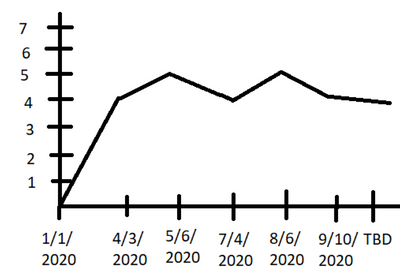
Any help to this would be extremely appreciated!
- Mark as New
- Bookmark Message
- Subscribe to Message
- Mute Message
- Subscribe to RSS Feed
- Permalink
- Report Inappropriate Content


This is a much simpler way given that you are using a line chart and don't need events for every day, just days when things change
| makeresults
| eval events="Open	4/3/2020	TBD
Closed	4/3/2020	9/10/2020
Open	4/3/2020	TBD
Open	4/3/2020	TBD
Closed	5/6/2020	7/4/2020
Closed	5/6/2020	8/6/2020
Open	8/6/2020	TBD"
| rex max_match=0 field=events "(?<events>.+)\n*"
| mvexpand events
| rex field=events "(?<Status>\w+)\s+(?<Opened>\d+/\d+/\d+)\s+(?<Closed>.+)"
| fields Status Opened Closed
| fields - _time

| eval _time=strptime(Opened,"%m/%d/%Y")
| eval closedate=strptime(Closed,"%m/%d/%Y")
| fieldformat closedate=strftime(closedate,"%Y-%m-%d")
| eval Status=if(Status="Closed",mvappend(Status,"Open"),Status)
| mvexpand Status
| eval _time=if(Status="Closed",closedate,_time)
| stats count as tickets by _time Status
| eval tickets=if(Status="Open",tickets,-tickets)
| stats sum(tickets) as change by _time
| streamstats sum(change) as tickets
| fields - change- Mark as New
- Bookmark Message
- Subscribe to Message
- Mute Message
- Subscribe to RSS Feed
- Permalink
- Report Inappropriate Content
I answered a similar problem here
Essentially, in your case, I would create an event for every day that the item is open. You would have to choose an end date to replace TBD, perhaps the latest date in your data, or todays date. You can then count the number of events for each day, and plot your chart accordingly.
As I said in my solution, it is complicated, and possibly not efficient, but it would provide the chart you are looking for.
- Mark as New
- Bookmark Message
- Subscribe to Message
- Mute Message
- Subscribe to RSS Feed
- Permalink
- Report Inappropriate Content
This is a much simpler way given that you are using a line chart and don't need events for every day, just days when things change
| makeresults
| eval events="Open	4/3/2020	TBD
Closed	4/3/2020	9/10/2020
Open	4/3/2020	TBD
Open	4/3/2020	TBD
Closed	5/6/2020	7/4/2020
Closed	5/6/2020	8/6/2020
Open	8/6/2020	TBD"
| rex max_match=0 field=events "(?<events>.+)\n*"
| mvexpand events
| rex field=events "(?<Status>\w+)\s+(?<Opened>\d+/\d+/\d+)\s+(?<Closed>.+)"
| fields Status Opened Closed
| fields - _time

| eval _time=strptime(Opened,"%m/%d/%Y")
| eval closedate=strptime(Closed,"%m/%d/%Y")
| fieldformat closedate=strftime(closedate,"%Y-%m-%d")
| eval Status=if(Status="Closed",mvappend(Status,"Open"),Status)
| mvexpand Status
| eval _time=if(Status="Closed",closedate,_time)
| stats count as tickets by _time Status
| eval tickets=if(Status="Open",tickets,-tickets)
| stats sum(tickets) as change by _time
| streamstats sum(change) as tickets
| fields - change- Mark as New
- Bookmark Message
- Subscribe to Message
- Mute Message
- Subscribe to RSS Feed
- Permalink
- Report Inappropriate Content

Hi @TooManyQuestion , by "line chart that illustrates the events status over its time frame" do you mean count of events status over time? What does the number represent on the Y-axis?
If above is true, try this, it will need additional logic for sequential date representation on the x-axis, but let me know first what is expected here.
|inputlookup <yourlookupname>
|stats count(Status) as count by Opened Date


Join the Splunk Community Slack to learn, troubleshoot, and make connections with fellow Splunk practitioners in real time!
Join Splunk User Groups to connect and learn in-person by region or remotely by topic or industry.
Your Feedback. Our Roadmap. Visit the PX Feedback Booth at .conf26
Agentic SOC Triage: Investigating Splunk ES Notables with MCP Server and a Local LLM
Painting a Clearer Picture: Creating Cross-Domain Visibility with AI Canvas
