
Join the Conversation
- Find Answers
- :
- Apps & Add-ons
- :
- All Apps and Add-ons
- :
- how to compare health of instances in splunk?
- Subscribe to RSS Feed
- Mark Topic as New
- Mark Topic as Read
- Float this Topic for Current User
- Bookmark Topic
- Subscribe to Topic
- Mute Topic
- Printer Friendly Page
- Mark as New
- Bookmark Message
- Subscribe to Message
- Mute Message
- Subscribe to RSS Feed
- Permalink
- Report Inappropriate Content
how to compare health of instances in splunk?

I have splunk enterprise installed in windows machine and It receiving Logs from 4 more systems using UF so if I want to compare the cpu usage memory ,resource utiliazation of all system in graphical way. How Can I do this in splunk ?
- Mark as New
- Bookmark Message
- Subscribe to Message
- Mute Message
- Subscribe to RSS Feed
- Permalink
- Report Inappropriate Content

Hi @anshuman19
Go to Settings>>Monitoring Console>>Forwarders>>Forwarders:Instance
There you need to configure forwarder monitoring
https://docs.splunk.com/Documentation/Splunk/7.0.1/DMC/Configureforwardermonitoring
and then you will see forwarder dashboards
http://docs.splunk.com/Documentation/Splunk/7.0.1/DMC/ForwardersDeployment
let me know if this helps!
- Mark as New
- Bookmark Message
- Subscribe to Message
- Mute Message
- Subscribe to RSS Feed
- Permalink
- Report Inappropriate Content

Hi @anshuman19
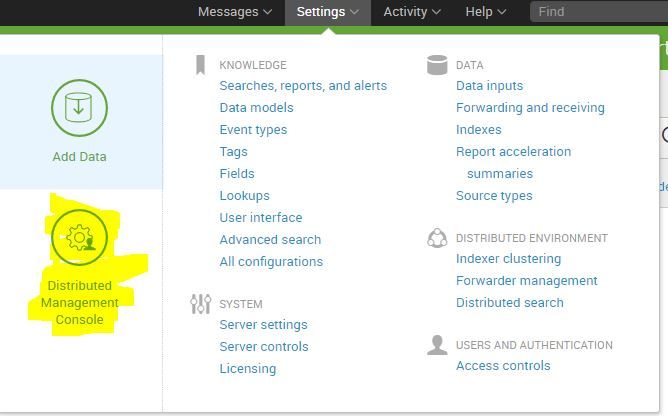
Go to Settings>>Distributed Management Console
Here you can see all performance related information like CPU usage, resource utilization in percentage as well as in visualiztion.
Hope this helps you.
- Mark as New
- Bookmark Message
- Subscribe to Message
- Mute Message
- Subscribe to RSS Feed
- Permalink
- Report Inappropriate Content

- Mark as New
- Bookmark Message
- Subscribe to Message
- Mute Message
- Subscribe to RSS Feed
- Permalink
- Report Inappropriate Content
I can't see Distributed Management Console in SETTING.

Your Guide to Splunk Digital Experience Monitoring
Data Management Digest – November 2025
Upcoming Webinar: Unmasking Insider Threats with Slunk Enterprise Security’s UEBA
