
Join the Conversation
- Find Answers
- :
- Apps & Add-ons
- :
- All Apps and Add-ons
- :
- What is the "index" field for in the metadata sect...
- Subscribe to RSS Feed
- Mark Topic as New
- Mark Topic as Read
- Float this Topic for Current User
- Bookmark Topic
- Subscribe to Topic
- Mute Topic
- Printer Friendly Page
- Mark as New
- Bookmark Message
- Subscribe to Message
- Mute Message
- Subscribe to RSS Feed
- Permalink
- Report Inappropriate Content

More specifically, what do the available options mean?
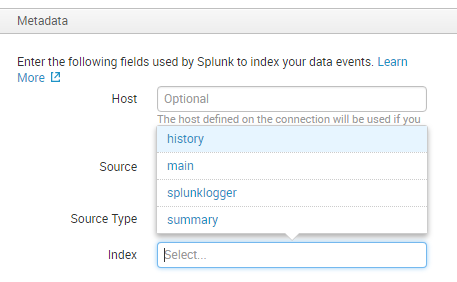
I can't find anything online that explains what you're supposed to put there. The available options don't seem to have any relevance to my database schema, which I would expect if it's indexing...

- Mark as New
- Bookmark Message
- Subscribe to Message
- Mute Message
- Subscribe to RSS Feed
- Permalink
- Report Inappropriate Content

@splunknoob408, seems like you are setting up DB Connect on fresh installation of Splunk Enterprise as these are default indexes that are created in Splunk. You would want to create a new index for your DB Connect Data (or your Splunk App data, depending on the need).
http://docs.splunk.com/Documentation/Splunk/latest/Indexer/Setupmultipleindexes
OR
http://docs.splunk.com/Documentation/Splunk/latest/Indexer/Setupmultipleindexes
Unless you have already done so, you should check out the demo videos of setting up DB Connect : https://splunkbase.splunk.com/app/2686/ OR https://www.youtube.com/watch?v=Q1Q3XvChI50
OR the DB Connect Documentation for complete details: http://docs.splunk.com/Documentation/DBX/latest/DeployDBX/Createandmanagedatabaseinputs
| makeresults | eval message= "Happy Splunking!!!"
- Mark as New
- Bookmark Message
- Subscribe to Message
- Mute Message
- Subscribe to RSS Feed
- Permalink
- Report Inappropriate Content
@splunknoob408, seems like you are setting up DB Connect on fresh installation of Splunk Enterprise as these are default indexes that are created in Splunk. You would want to create a new index for your DB Connect Data (or your Splunk App data, depending on the need).
http://docs.splunk.com/Documentation/Splunk/latest/Indexer/Setupmultipleindexes
OR
http://docs.splunk.com/Documentation/Splunk/latest/Indexer/Setupmultipleindexes
Unless you have already done so, you should check out the demo videos of setting up DB Connect : https://splunkbase.splunk.com/app/2686/ OR https://www.youtube.com/watch?v=Q1Q3XvChI50
OR the DB Connect Documentation for complete details: http://docs.splunk.com/Documentation/DBX/latest/DeployDBX/Createandmanagedatabaseinputs
| makeresults | eval message= "Happy Splunking!!!"
- Mark as New
- Bookmark Message
- Subscribe to Message
- Mute Message
- Subscribe to RSS Feed
- Permalink
- Report Inappropriate Content
Thank you, I will read the docs and watch the video. I did a tutorial for DB Connect, but I don't recall it explaining how to create the index -- I think it was already in the list because he was using standard Splunk log data.

Upcoming Webinar: Unmasking Insider Threats with Slunk Enterprise Security’s UEBA
.conf25 technical session recap of Observability for Gen AI: Monitoring LLM ...
A Season of Skills: New Splunk Courses to Light Up Your Learning Journey
