
Join the Conversation
- Find Answers
- :
- Apps & Add-ons
- :
- All Apps and Add-ons
- :
- Splunk Add-On for Windows Event Cleanup- What is h...
- Subscribe to RSS Feed
- Mark Topic as New
- Mark Topic as Read
- Float this Topic for Current User
- Bookmark Topic
- Subscribe to Topic
- Mute Topic
- Printer Friendly Page
- Mark as New
- Bookmark Message
- Subscribe to Message
- Mute Message
- Subscribe to RSS Feed
- Permalink
- Report Inappropriate Content

Hi All,
I am currently working on ingesting WinEventLog:Security data and noticed that the event has been cleaned up even though I didn't configure the SEDCMD extractions in my props configuration. Please note that the props.conf in my local folder is exactly the same copy of the props.conf in my default folder.

I am looking specifically at the certificate information and would like it to be seen in my data in Splunk

This is what it looks like in Splunk:

I expect to also have the same data as what I have in my source
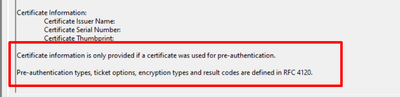
Any idea what happened and how can I troubleshoot to determine what's causing this to my data?
Your help is greatly appreciated.
Thanks in advance!
- Mark as New
- Bookmark Message
- Subscribe to Message
- Mute Message
- Subscribe to RSS Feed
- Permalink
- Report Inappropriate Content
We have the configurations in the deployment server which I wasn't able to use btool command but I was able to figure out what causes the missing text/lines. Apparently, there are other Windows TA folders configured and I got to see where the SEDCMD extractions were enabled. I checked the source type configurations in our SH Cloud and found that the extractions were renamed differently instead of having the default
SEDCMD-clean_info_text_from_winsecurity_events_certificate_information = s/Certificate information is only[\S\s\r\n]+$//g
it was renamed to SEDCMD-clean2 s/Certificate information is only[\S\s\r\n]+$//g.
Appreciate your response! 🙂
- Mark as New
- Bookmark Message
- Subscribe to Message
- Mute Message
- Subscribe to RSS Feed
- Permalink
- Report Inappropriate Content
We have the configurations in the deployment server which I wasn't able to use btool command but I was able to figure out what causes the missing text/lines. Apparently, there are other Windows TA folders configured and I got to see where the SEDCMD extractions were enabled. I checked the source type configurations in our SH Cloud and found that the extractions were renamed differently instead of having the default
SEDCMD-clean_info_text_from_winsecurity_events_certificate_information = s/Certificate information is only[\S\s\r\n]+$//g
it was renamed to SEDCMD-clean2 s/Certificate information is only[\S\s\r\n]+$//g.
Appreciate your response! 🙂
- Mark as New
- Bookmark Message
- Subscribe to Message
- Mute Message
- Subscribe to RSS Feed
- Permalink
- Report Inappropriate Content
Have you verified with btool that the shown props.conf setting are applied?

Upcoming Webinar: Unmasking Insider Threats with Slunk Enterprise Security’s UEBA
.conf25 technical session recap of Observability for Gen AI: Monitoring LLM ...
A Season of Skills: New Splunk Courses to Light Up Your Learning Journey
