
Join the Conversation
- Find Answers
- :
- Apps & Add-ons
- :
- All Apps and Add-ons
- :
- All Apps and Add-ons
- :
- Edit Choropleth Map Tooltip
- Subscribe to RSS Feed
- Mark Topic as New
- Mark Topic as Read
- Float this Topic for Current User
- Bookmark Topic
- Subscribe to Topic
- Mute Topic
- Printer Friendly Page
- Mark as New
- Bookmark Message
- Subscribe to Message
- Mute Message
- Subscribe to RSS Feed
- Permalink
- Report Inappropriate Content
Edit Choropleth Map Tooltip

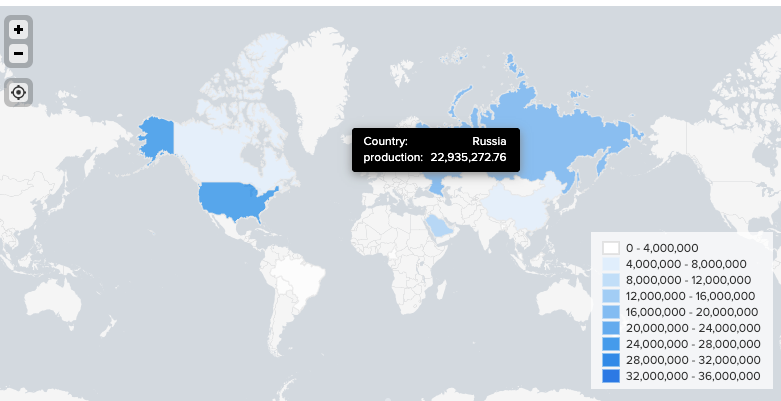
Hi Splunkers,
I am using a choropleth map. How to add another row of fields on the tooltip.
Example:
Country: Texas
Year: 2019
Market_Segments: 100,000
Correlation_Label_Specific
The search I use is:
| inputlookup global_merge_full_2019.csv
| stats sum(Production) as Production by Country, Year, Market_Segments, Correlation_Label_Specific
| geom geo_countries featureIdField=Country
| fields Year, Market_Segments, Correlation_Label_Specific, Country, Production,featureCollection,geom
Thank you in advance,
Best,
Evelyn Li
(similar post here:https://community.splunk.com/t5/All-Apps-and-Add-ons/choropleth-map-tooltip/m-p/428733)
- Mark as New
- Bookmark Message
- Subscribe to Message
- Mute Message
- Subscribe to RSS Feed
- Permalink
- Report Inappropriate Content

I have only been able to do this in Dashboard Studio.
While the Splunk Search and Splunk Dashboard Classic don't seem to render with extra fields on the tooltip, Dashboard Studio allows you to select your primary 'value' field for the heatmap and add additional fields to the tooltip.
So you can end your search with something like this:
| table state_name PercentOffline offlineHosts
| geom geo_us_states featureIdField=state_name
Then Dashboard Studio's Map tile's Data Configuration tab has sections for Area Values (set your choropleth coloring with this) and Additional Tooltip fields (as the name suggests).

Join the Splunk Community Slack to learn, troubleshoot, and make connections with fellow Splunk practitioners in real time!
Join Splunk User Groups to connect and learn in-person by region or remotely by topic or industry.
[Puzzles] Solve, Learn, Reuse: Word-play
Tuning Edge Processor in Hybrid Mode: What Limits Each Data Path
Best Practices: Splunk auto adjust pipeline queue
