
Join the Conversation
- Find Answers
- :
- Using Splunk
- :
- Other Using Splunk
- :
- Alerting
- :
- Splunk "real-time" using system resources ?
- Subscribe to RSS Feed
- Mark Topic as New
- Mark Topic as Read
- Float this Topic for Current User
- Bookmark Topic
- Subscribe to Topic
- Mute Topic
- Printer Friendly Page
- Mark as New
- Bookmark Message
- Subscribe to Message
- Mute Message
- Subscribe to RSS Feed
- Permalink
- Report Inappropriate Content
Splunk "real-time" using system resources ?

Hello SPlunkers,
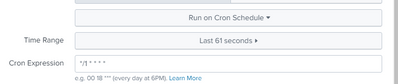
'real-time' alerts are using up the maximum resources and resulting in skipped searches. does using a cron schedule which runs every 1 minute and the time range of last 61 seconds also cause stress to the system. What would be the ideal time range to use ?
- Mark as New
- Bookmark Message
- Subscribe to Message
- Mute Message
- Subscribe to RSS Feed
- Permalink
- Report Inappropriate Content


Every search effects system performance but while it is running. But changing from realtime to scheduled will help for sure.
Each realtime search keeps one CPU core all the time, that is why may causes skipped searches if search concurrency is high. When you change search to scheduled, it will release resources after search finalize. Splunk will be able to use those resource for other searches or processes.
If you do not need to get that alert immediately, higher is better. It is better to think your response time to alert, if you cannot act immediately there maybe no need to run search realtime or every minute.
- Mark as New
- Bookmark Message
- Subscribe to Message
- Mute Message
- Subscribe to RSS Feed
- Permalink
- Report Inappropriate Content
Hi @SS1,
If your search does not take more than a minute, scheduled mode will help you a lot. You can use below crontab to run every minute;
* * * * *
- Mark as New
- Bookmark Message
- Subscribe to Message
- Mute Message
- Subscribe to RSS Feed
- Permalink
- Report Inappropriate Content
My question is will it affect the perfomance of the splunk system if the cron runs every min?


Join the Splunk Community Slack to learn, troubleshoot, and make connections with fellow Splunk practitioners in real time!
Join Splunk User Groups to connect and learn in-person by region or remotely by topic or industry.
test 2
test
Join the Hackathon at .conf26 and build a No-Code AI agent
