
Join the Conversation
- Find Answers
- :
- Using Splunk
- :
- Other Using Splunk
- :
- Alerting
- :
- How do I add host and description of error code in...
- Subscribe to RSS Feed
- Mark Topic as New
- Mark Topic as Read
- Float this Topic for Current User
- Bookmark Topic
- Subscribe to Topic
- Mute Topic
- Printer Friendly Page
- Mark as New
- Bookmark Message
- Subscribe to Message
- Mute Message
- Subscribe to RSS Feed
- Permalink
- Report Inappropriate Content

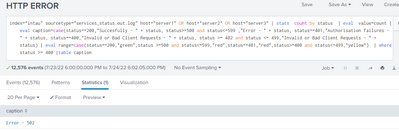
I have the below query for an alert, but the result does not add host or description in the result, how can i achieve this?
- Mark as New
- Bookmark Message
- Subscribe to Message
- Mute Message
- Subscribe to RSS Feed
- Permalink
- Report Inappropriate Content


There are two reasons why the host and description fields are not shown.
1) The stats command removed them. stats is a transforming command that only passes on the field explicitly mention - in this case count and status.
2) The table command only displays the caption field.
The fixes for host are pretty straightforward - add the field to the stats and table commands.
... | stats count by host, status
...
| table host, caption
Adding the description field likely can be done in a similar manner, but the screenshot tells us nothing about that field so it's hard to say for sure.
If this reply helps you, Karma would be appreciated.
- Mark as New
- Bookmark Message
- Subscribe to Message
- Mute Message
- Subscribe to RSS Feed
- Permalink
- Report Inappropriate Content
There are two reasons why the host and description fields are not shown.
1) The stats command removed them. stats is a transforming command that only passes on the field explicitly mention - in this case count and status.
2) The table command only displays the caption field.
The fixes for host are pretty straightforward - add the field to the stats and table commands.
... | stats count by host, status
...
| table host, caption
Adding the description field likely can be done in a similar manner, but the screenshot tells us nothing about that field so it's hard to say for sure.
If this reply helps you, Karma would be appreciated.


Join the Splunk Community Slack to learn, troubleshoot, and make connections with fellow Splunk practitioners in real time!
Join Splunk User Groups to connect and learn in-person by region or remotely by topic or industry.
SOC4Kafka - New Kafka Connector Powered by OpenTelemetry
Rounding off the Splunk Dashboard Contest
A Four Part Event Series: AI + Observability: AI Agents, LLMs, Apps, & Infrastructure
